Curo
A cleaner CRM for sales reps who don't like clutter
Overview
Curo is a powerful CRM platform, designed to increase productivity of B2B sales teams by giving them full control over their leads. It aggregates and visualizes sales data, allowing sales reps to make informed decisions, efficiently track leads throughout the sales funnel, and improve overall performance.
- Problem
- B2B sales executives lack a solid platform where they can manage their leads, opportunities and performance, efficiently at one place. They juggle between multiple specialist tools instead.
- What I did
- I focused on one core problem, managing contacts, and designed a kanban view with drag & drop for moving contacts through the stages of their lifecycle.
- Outcome
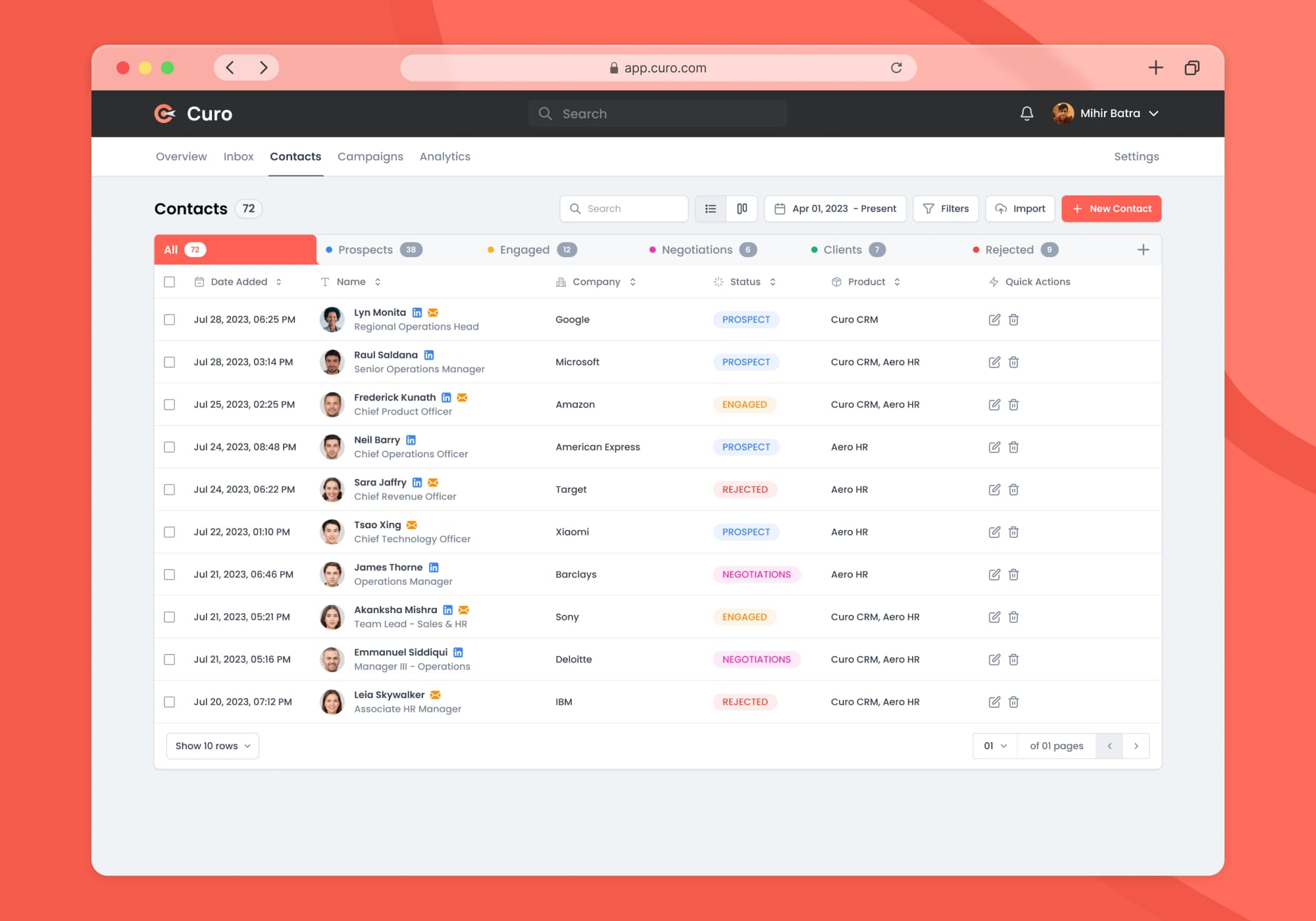
- Hi-fi screens for the contact lifecycle and a basic design system to keep them consistent. Inbox, Campaigns and Analytics screens are next.
Problem
Today, the sales experience for reps relies heavily on technology. A good CRM tool helps sales teams track and close deals quicker and more efficiently.
Despite this, B2B sales executives lack a solid platform where they can manage their leads, opportunities and performance, efficiently at one place. They often find themselves having to juggle between multiple specialist tools to manage different sales processes.
For a sales rep, time is money. Hurdles like this disrupts sales workflow, fragments customer data across isolated systems, and makes it difficult to gain a clear view of the sales pipeline.
Objectives
- Design a comprehensive platform which declutters sales workflows and improves efficiency of sales reps by make it easier to track drop-offs in sales pipelines
- Make sure that the users are able to seamlessly integrate the tool into their daily routines
Goals
- How might we create a more human and delightful experience for sales reps?
- How might we increase productivity of sales executives by streamlining and optimizing daily tasks?
- How might we create the contact management process in sales intuitive and hassle-free?
Research
When it comes to traditional CRMs, there's an abundance of options available online to choose from. I tried out the trial / free / demo versions of some of the major players in this domain (Salesforce, Hubspot, Zoho, Zendesk) to get an idea of the usability, functionality and affordability these options provided to the users. Here are some of the questions I sought to answer through the competitor analysis:
- What is already out there?
- What are they doing good/bad?
- What do I want to do differently?
After a comprehensive study, I realized that for sales teams, especially those of small businesses, finding the perfect CRM tool can be tricky.
Feature-rich options come with a steep learning curve (and really bad UX), easy to use platforms may lack the power needed for complex sales cycles, and budget-friendly choices often cut functionalities short. For instance, here's a screenshot of Salesforce's CRM that sales rep have to look at everyday:
To further understand the problem, I conducted research interviews with B2B sales executives by reaching out to them on LinkedIn to uncover any pain points that they are experiencing with their CRMs. I also decided to interview some friends in business development to gain better insights.
Here's an introductory cold message I sent out to sales reps and managers on LinkedIn for the user research:
My research encompassed:
- Understanding the user goals, paint points and needs
- Uncovering pain points with the existing user journey
- Determining the success of the tasks measured
Based on the user interviews conducted with four users (24-35 years old, working in B2B sales in tech / product companies), I identified general patterns in their responses and summarised it into a user persona:
Ideation & Wireframing
I researched on internet to understand the processes behind B2B sales and what leads a sale from start to finish. Through my research on internet forums, competitor websites and insight portals, I gathered valuable insights about outreach, sales funnel and closing deals that would stay with me after the project as well.
I identified that the major challenge lies in managing contacts and opportunities. For a start, I decided to focus on optimising only one core problem: managing contacts. The goal was to deliver a seamless experience to the sales rep when they're creating new contacts and shifting to (and fro) to the different stages of a contact lifecycle.
Design
I started sketching out different layouts to organise the contacts data. I wanted to expand upon the generic tabular list view approach the competitors usually do. The generally sequential nature of shifting contacts into different stages of lead life cycle inspired me to design a kanban view with drag & drop functionality to improve upon the interactibility and intuitivity of the process.
Soon after I settled on a vision, I wireframed the sketches on Figma and moved on to working on the hi-fi design. I created a moodboard to decide on a style guide for the hi-fi screens. I also decided to establish a very basic design system to start so that the consistency is maintained throughout the screens.
Next Steps
No product is ever perfect. There's always room for improvement, sooner or later. This is what's next for Curo:
- Further innovation and refining of the design.
- Expanding the design to further include Inbox, Campaigns and Analytics screens.