AutoQA
Reimagining Quality Assurance from 0 → 1
Overview
AutoQA is a Quality Assurance platform, designed to transform the way organizations evaluate customer support interactions and surface insights. Built with the core users in mind, AutoQA combines streamlined workflows, intelligent scoring mechanisms, and actionable coaching tools into a user-friendly product.
- Problem
- Kapture's AI-powered evaluation struggled with adoption. Its workflows were fragmented and overly complex, and customers had to buy into the entire ticketing ecosystem just to access it.
- What I did
- I reimagined quality assurance as AutoQA, a standalone product purpose-built for quality assurance and the teams that run it: configuration, scoring, coaching and dashboards.
- Outcome
- The new platform was met with overwhelmingly positive feedback during client trials. Setup time is projected to reduce by 60% with the new workflows.
Background
In customer support, quality assurance is how organizations evaluate if their agents are actually doing a good job. Are they following protocol? Are they resolving issues? Are they being human about it? QA teams evaluate conversations against a scorecard, identify insights, and feed them back into coaching agents.
Kapture CX, an enterprise-grade customer experience platform, brought AI-powered evaluation to this process. The capability attracted interest, but the feature struggled with adoption. Usage data and client feedback highlighted significant usability gaps in the product. Users often struggled with its fragmented and overly complex workflows. Since this feature lived inside Kapture's larger CX platform, it meant customers had to buy into the entire ticketing ecosystem just to access it. For many, that wasn't a trade-off worth making.
Leadership recognized a real market for a dedicated QA product, one that wasn't gated behind a full platform migration. I was tasked with reimagining quality assurance as AutoQA, a standalone product purpose-built for quality assurance and the teams that run it.
Research
I spent the early weeks talking to teams across 15+ client accounts who used this feature to learn how they worked, where the product failed them, and what they'd given up trying to fix.
- Fragmented workflows
- Basic actions like scoring tickets and viewing scorecards required switching between multiple screens.
- Overwhelming configurations
- Many admins struggled with the complicated and time-intensive setup process of the evaluation scorecards.
- Evaluator fatigue
- Evaluators cited experiencing burnout due to the repetitive and manual scoring process.
- No coaching mechanisms
- Managers had no way to route evaluation results into targeted feedback or track agent improvement over time.
Next, to benchmark AutoQA and gather inspiration, I studied quality assurance platforms like Kaizo, Klaus and Maestro, looking at how they approached configuration, scoring, and integrations.
- AI-driven scoring
- Some platforms integrated AI to suggest evaluation responses, reducing manual effort and evaluation time.
- Platform terminology
- Most platforms had adopted industry-standard terminology to help users understand features more intuitively.
Ideation & Wireframing
I mapped out user journeys on FigJam, working role by role to understand how the core users would move through the product.
User journeys of the core users of the platform
Configurations
The design process began with rethinking the highest-friction area, the scorecard setup. The existing design used a side overlay, which meant administrators were editing complex evaluation criteria in a narrow, scroll-heavy panel. My goal was to move away from the cramped side overlay format in the current platform and define an easier setup workflow for administrators.
Wireframes of the configuration page of a scorecard
After exploring multiple layouts, I moved configuration into a full-page experience with segmented tabs that organized complex configurations into manageable sections. This structure significantly reduced cognitive overload. To further ease the setup process, I added the option for administrators to build scorecards by using pre-configured templates or uploading their evaluation policy documents.
Scoring
The old scoring flow was a static form. This was the primary source of evaluator fatigue.
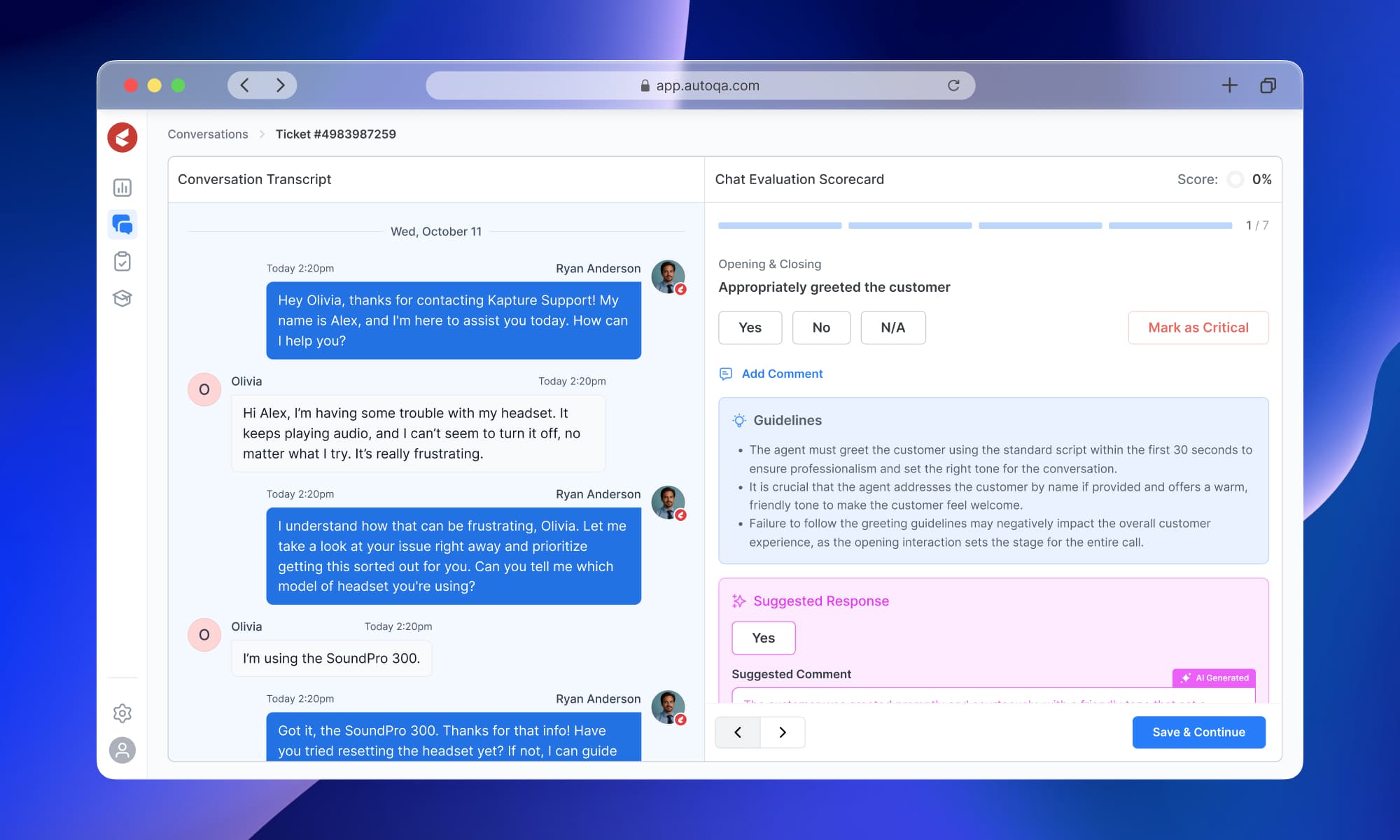
I replaced it with a question-by-question flow where the score and progress bar update as the evaluator works through each criterion, providing a sense of accomplishment and continuity throughout the task. The conversation transcript stays visible alongside the scorecard for reference, and AI-powered suggestions are available at each step to support the evaluator's judgment without replacing it.
All of this lives inside a unified Conversations workspace. Scoring, past evaluations, and conversation history in one place. Once an evaluation is complete, it goes to the agent, who can review the scorecard report and either accept or rebut.
Wireframes of the Conversations space and the scoring process
Coaching
The coaching module was another critical addition. I designed a space where administrators could upload training materials, create assessments, and set automated criteria for assigning coaching resources to agents based on evaluation results. This feature closed the loop between evaluation and actionable feedback and ensured that QA evaluations had a lasting impact.
Dashboards
Once the foundation for the core modules was established, I turned my attention to the dashboards. By using data and insights from active users, I designed role-specific dashboards to give everyone a clear view of performance metrics. Agents and evaluators could track their own performance, while managers and leaders could monitor the system's effectiveness to ensure everything runs smoothly.
Style Guide
I put together a style guide with structured typography, a mature color palette, and consistent interaction patterns across the platform. Dark mode, adjustable text sizes, and high-contrast themes are built in as standard accessibility features.
Design
Results
Prototypes were tested with a select group of clients. The new platform was met with overwhelmingly positive feedback during client trials. Setup time is projected to reduce by 60% with the new workflows. Managers also anticipate significant improvements in agent and evaluator performance with this product.
The design was successfully handed off to engineering, with detailed prototypes and documentation. AutoQA now stands tall as a specialized product independent of Kapture CX's ecosystem. Stakeholders cited that the redesign not only resolved the pain points of the previous module but also opened new opportunities for market expansion and innovation.